User Manual
Everything Flip Ledger does and how to use it. Screenshots below use made-up sample data, not your real account.
Logging in
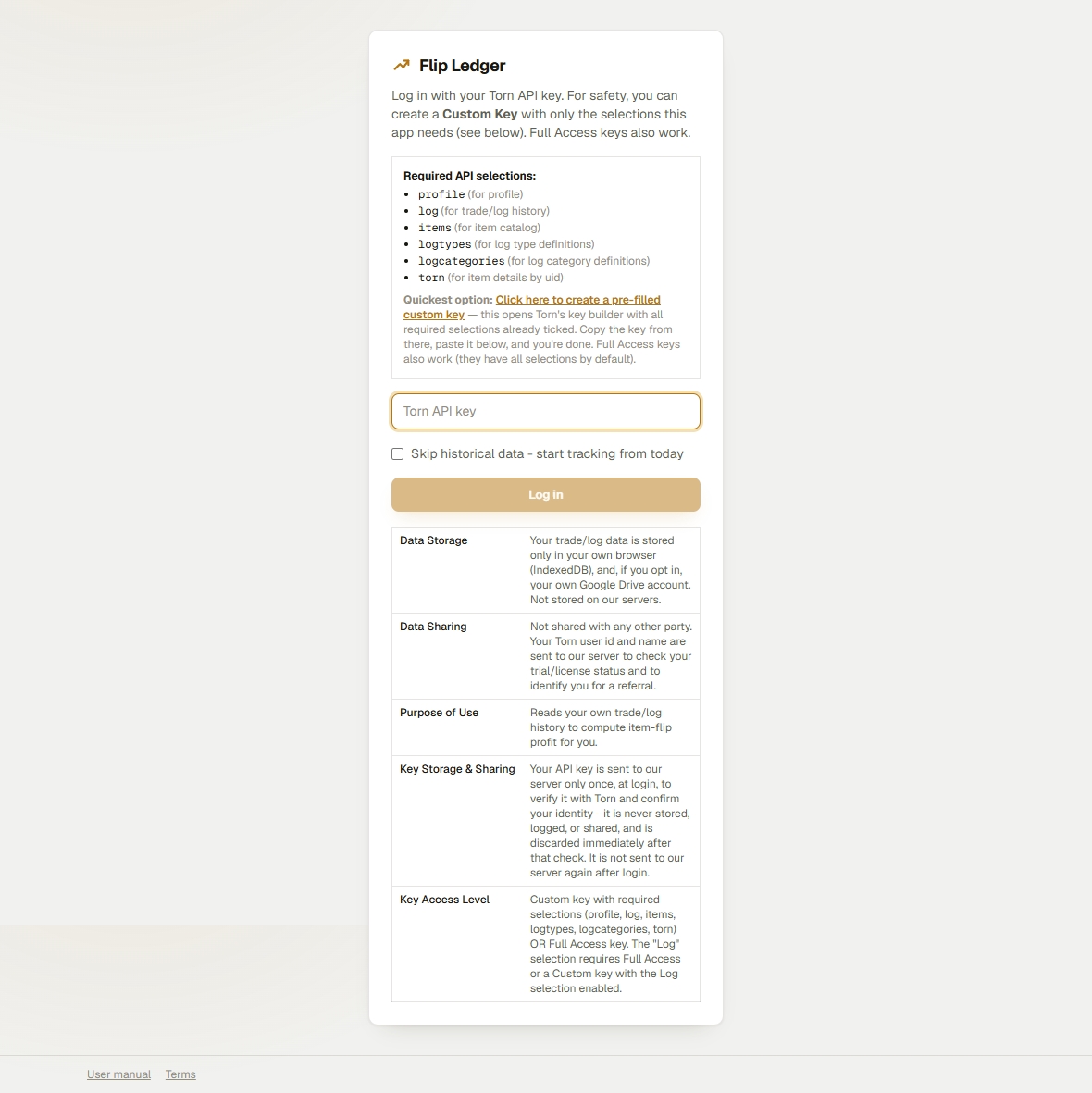
Enter your own Torn API key on the login screen. You can use a Custom keywith the required selections shown there, or a Full Access key. The key is sent to our server once, to verify it with Torn and confirm your identity, then saved only in this browser from then on - it is never stored, logged, or sent again after that. Never enter another player's key or use a key to access data that is not yours. See the disclosure table on the login page for the exact data flow.
Dashboard
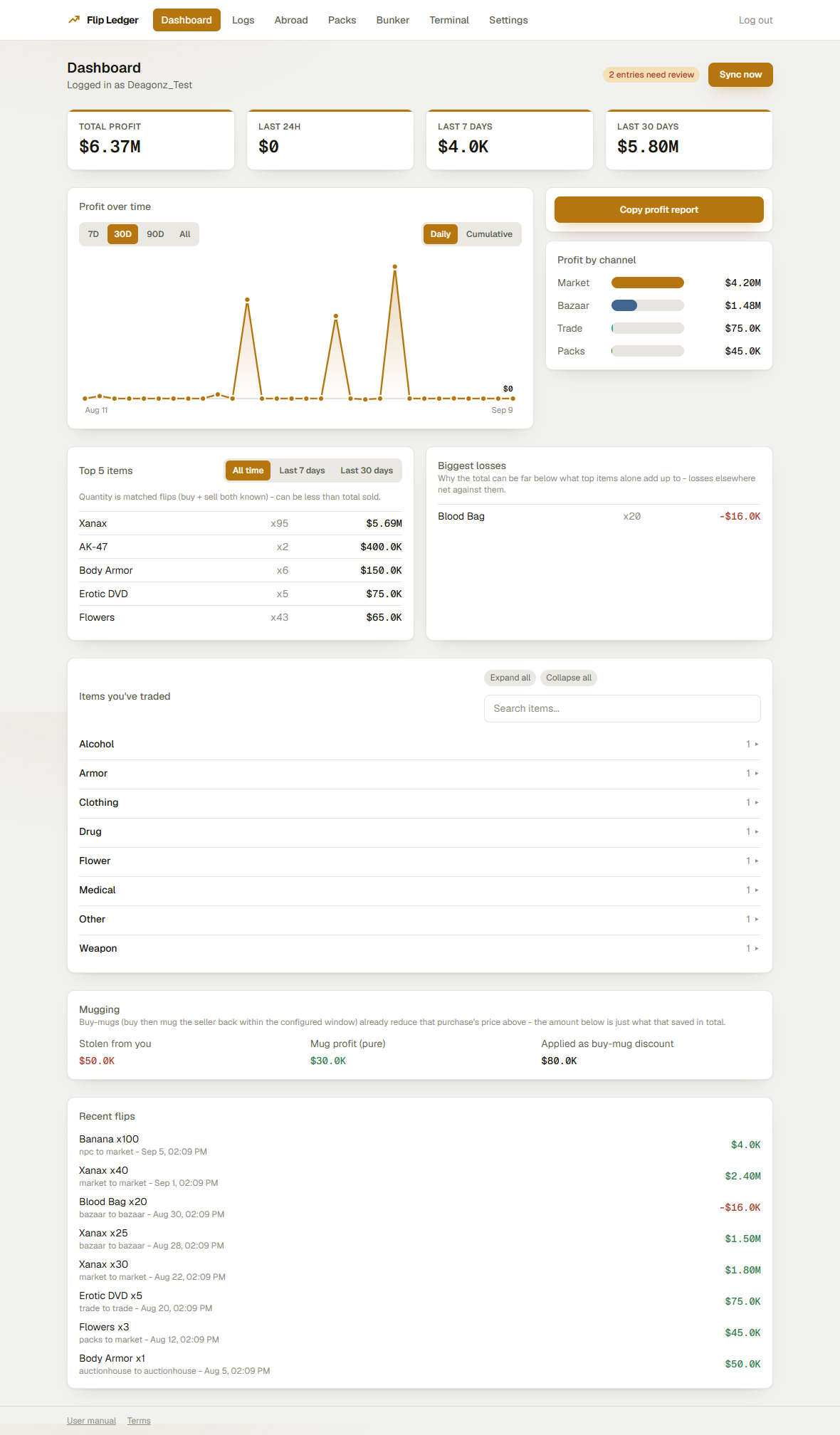
The home screen after logging in. It auto-syncs your Torn log on load and every 2 minutes (a manual Sync now button is also there), then summarizes everything:
- Total, last-24h, 7-day, and 30-day profit tiles.
- A profit-over-time chart with 7D/30D/90D/All range buttons, a Custom option that reveals two date pickers for an exact from/to range, and a Daily / Cumulative toggle - Daily plots each day's profit, Cumulative plots the running total across the selected range - plus a per-channel (market/bazaar/trade/abroad/npc/packs/auctionhouse/bunker/crimes/ points/museum, with Weapon/Armor flips broken into their own bucket regardless of which venue they traded through) breakdown and a Copy profit report button that copies a text summary of the selected range to your clipboard, ready to paste in-game.
- Top 5 most profitable items (with an All time / Last 7 days / Last 30 days toggle) and your biggest-losing items, both linking into filtered Logs.
- Items you've traded - a searchable, category-grouped browser of every item you've ever bought or sold, with Expand all/Collapse all buttons for the category list; click an item to jump to its Logs.
- A Mugging card: money stolen from you, pure profit from mugging others, and how much of that was already applied as a buy-mug discount (see Settings).
- Your last 8 flips - each item name links into its filtered Logs, same as Top 5/Biggest losses.
- An "N entries need review" link when trades couldn't be auto-priced - jumps straight to the filtered Logs view.
Terminal
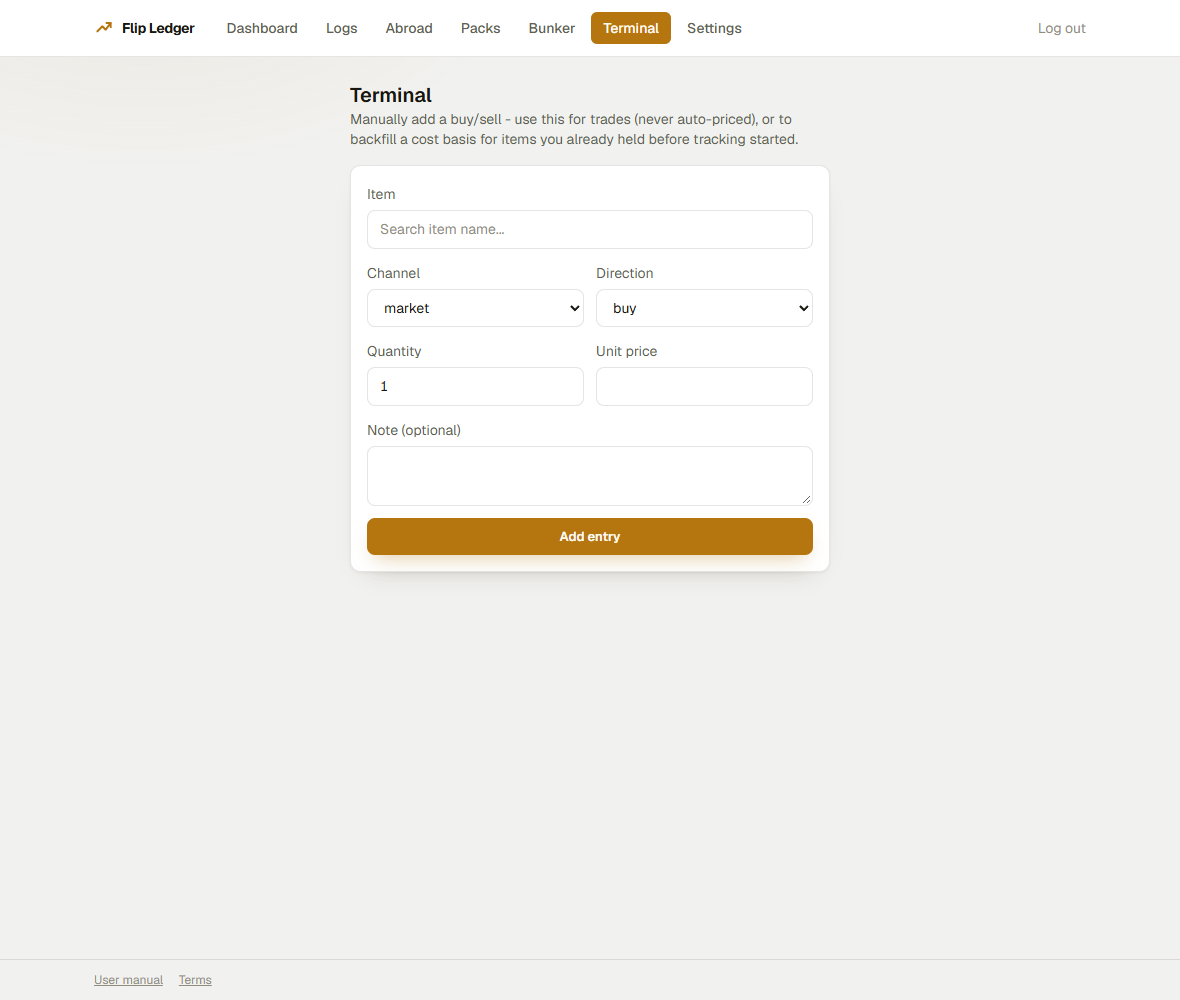
A manual buy/sell entry form. Use it for trades (which are never auto-priced by Torn's log) or to record a cost basis for items you already held before you started tracking. Search for the item, pick channel and direction, and enter quantity, unit price, and an optional note. Saving it immediately recomputes profit for that item. Requires an active trial or Premium license - Free/expired accounts see an upgrade prompt instead.
Logs
The full, paginated (30 rows/page) history of everything the app has synced or you've entered manually. Filter by channel or by "needs review only".
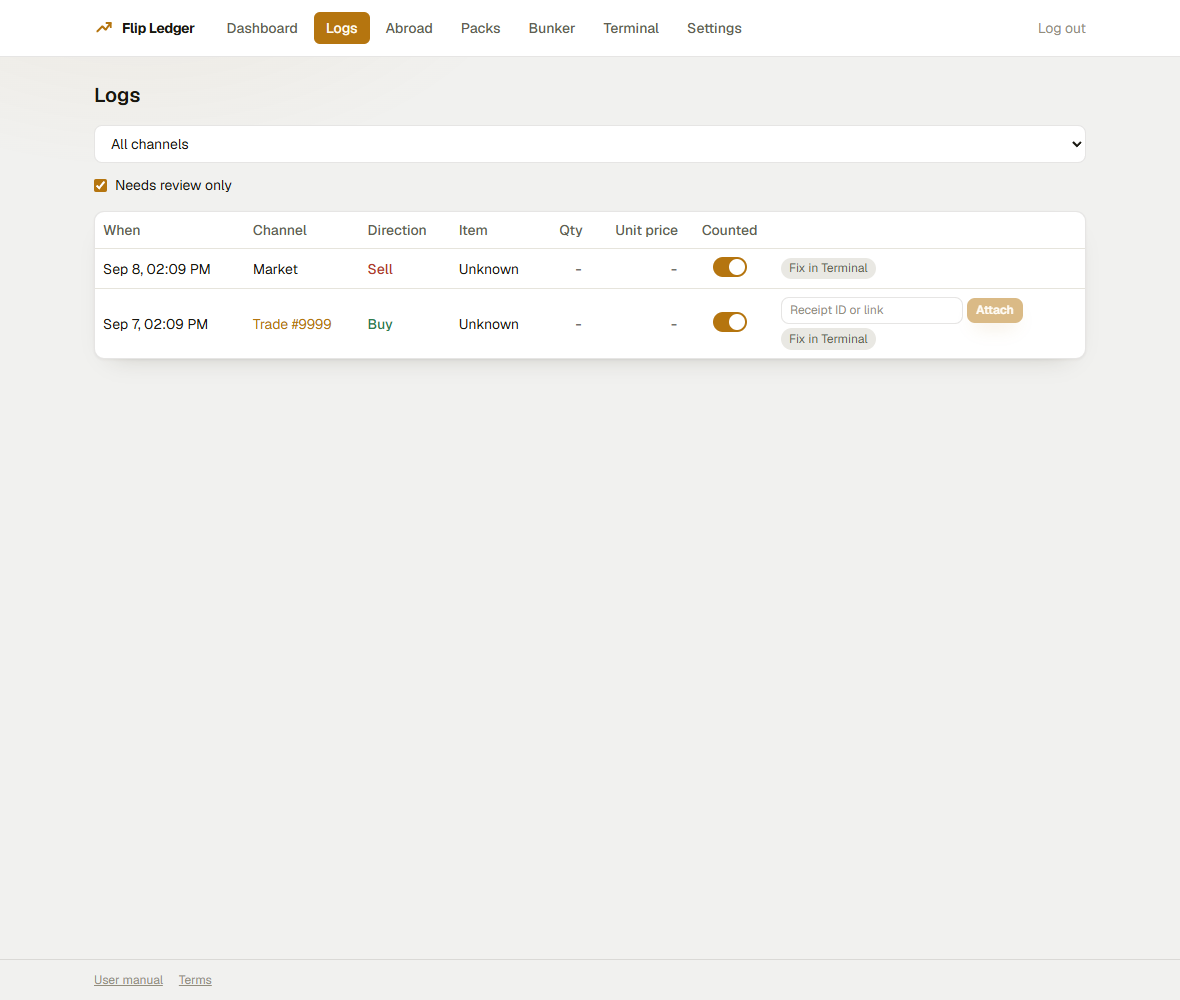
Every row has a Counted checkbox to exclude it from profit without deleting it (e.g. a personal-use item, not a flip) - checked means it counts, unchecked means it's excluded. Hold Shift and click a second row's checkbox to apply that same checked/unchecked state to every row in between in one action, instead of one row at a time. Trade-channel rows link straight to the matching trade on torn.com. A row already reduced by a tracked buy-mug shows a 🥊 badge with the discount amount.
Clicking an item name filters Logs to just that item, adding a summary (bought/sold totals, matched profit) and a manual matching tool: check one or more buy rows and one or more sell rows, then link them at their exact prices instead of relying on FIFO order - useful for stockpiled items you didn't sell oldest-first. Selecting an equal number of buys and sells lets you type one shared quantity and links them in order (first buy to first sell, and so on). Selecting a different number of buys and sells instead auto-splits by each row's remaining quantity, oldest selected first - e.g. one 100-unit sell can be covered by three buys in a single click - and tells you how much (if any) is left unlinked on whichever side ran out first. A Select all items on this page button checks every eligible row at once. Requires an active trial or Premium license - Free/expired accounts see an upgrade prompt instead of the linking controls.
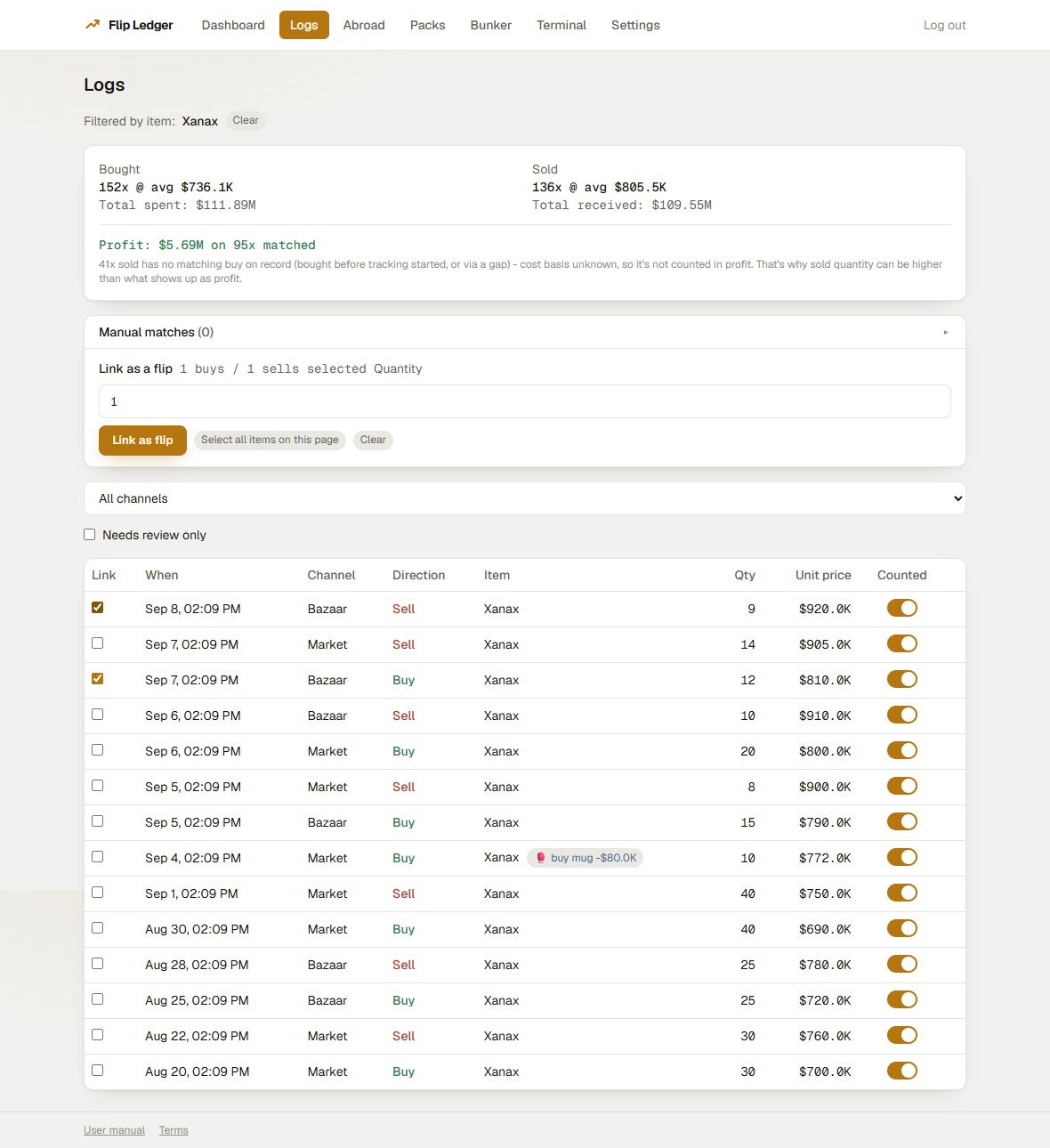
UID-based items (weapons/armor): For non-fungible items, a collapsibleItem instances table appears showing every unique item instance (by UID) ever bought or sold, with quality, bonuses, rarity, status (open/sold/unmatched-sell), buy/sell prices, and per-instance profit. Use the Refresh stats button to re-fetch the latest stats from Torn.
Manual matches: Below the instances table, a collapsibleManual matches card lists all user-created links for that item (paginated 20 per page). Each shows the linked buy/sell log IDs and quantity, with anUnlink button to remove the match.
Shift-click range selection: When checkboxes are visible (item-filtered view), hold Shift and click a second checkbox of the same direction (buy or sell) to select all rows between the two - Windows-style range selection for faster multi-flip linking.
For trades with multiple item types, Torn's log can't split the lump sum between them, so they land in needs-review. If you use weav3r.dev receipts, set your weav3r API key in Settings and matching receipts auto-attach during sync; otherwise paste a receipt ID/link by hand on the row itself using theAttach receipt input that appears on trade rows. A TornExchange API key in Settings does the same thing as a second, independent receipt source - since TornExchange receipts don't carry a trade id to confirm against (unlike weav3r), a match only auto-attaches when exactly one receipt fits the trade's value and timing.
If auto-matching didn't find a receipt for a trade, paste a link on the row as described above. Only receipts made by you will work - if the other player made theirs, make one yourself here.
Abroad
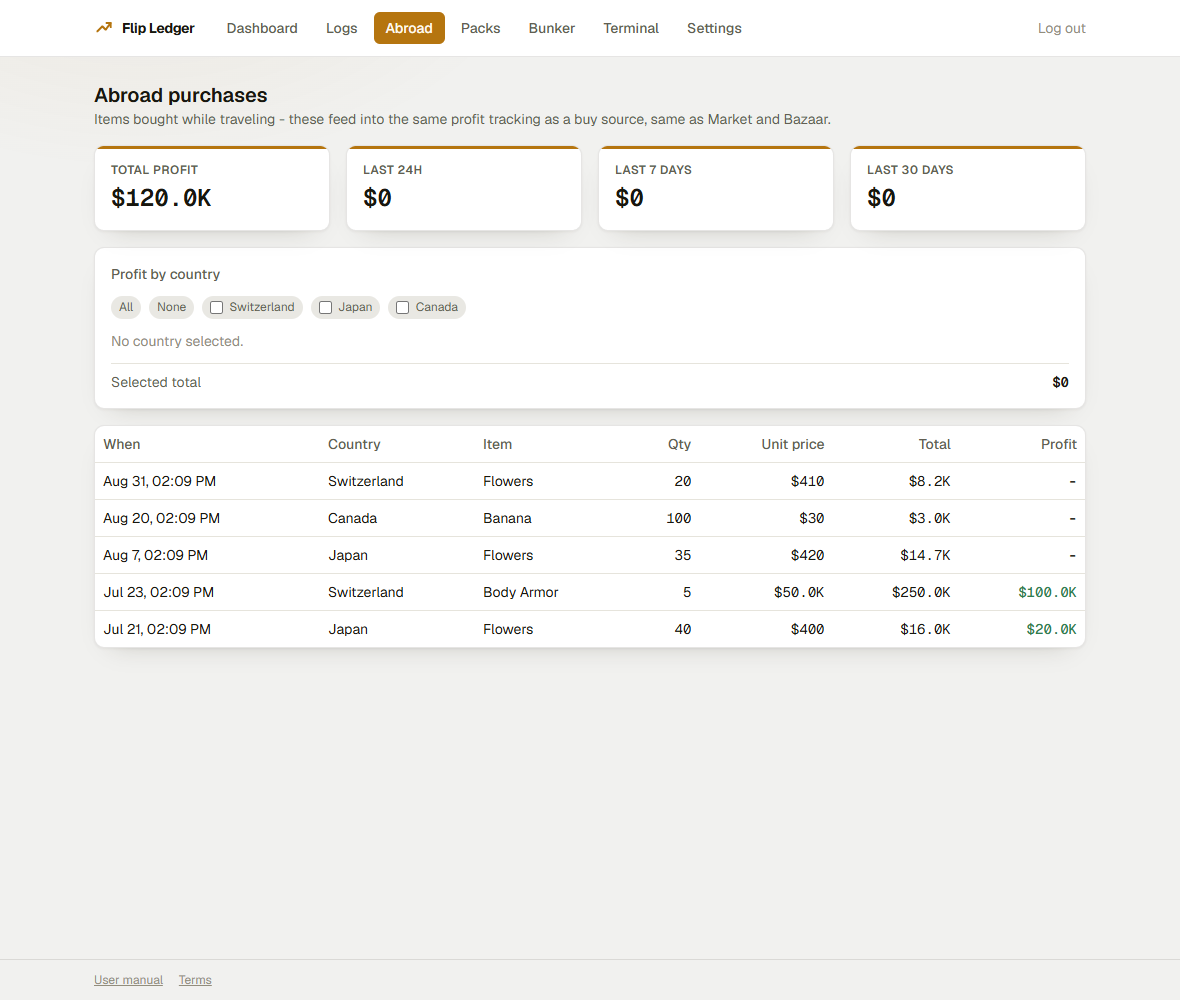
A read-only table of items bought while traveling. These count as a buy source for profit the same way market and bazaar purchases do - this page is just for browsing them.
The page also includes a Profit by country bar chart. Click a country bar (or use the checkboxes below it) to filter both the chart and the transactions table to that destination. Select all / Deselect all buttons are provided for convenience.
Packs
A read-only table of items received from opening a Supply Pack, wallet, or any similar random-reward item. They're added at $0 cost - since you didn't pay anything for the specific item you got, only for the pack itself - so profit shows up on the Dashboard once you actually sell them, credited to the packs channel no matter where you end up selling.
The page also includes a Profit by pack bar chart. Click a pack bar (or use the checkboxes below it) to filter both the chart and the transactions table to that pack type. Select all / Deselect all buttons are provided. The profit tiles at the top include a Last 14 days tile in addition to Total, 24h, 7d, and 30d.
Museum
Tracks points earned from museum donations and, when you later sell those points on the Points Market, the real net profit of the whole loop - not just points earned.
Torn's museum only lets you donate a complete set at a time (e.g. all 13 Plushies for the Plushie Set, or a single Ganesha Sculpture). Because every set needs a fixed, known list of items, this app can price out exactly what those donated items cost you and net it against what the points later sold for - the donated points themselves are tracked at $0 cost until sold, so profit only shows up once, the same way it does everywhere else in this app.
- Total points, items exchanged, and points sold so far tiles.
- Net profit realized - points sold for cash, minus the real cost of the items donated to earn them. Only sets this app knows the exact item list for (Plushie Set, Exotic Flower Set, and every single-item artifact/sculpture) get their item cost subtracted; an unrecognized set still earns points normally, it just won't reduce the total.
- A per-set breakdown table (exchanges, items, points) and a recent-exchanges list.
Buying and selling points directly on the Points Market (without ever visiting the museum) is tracked too, as ordinary flips on the points channel - separate from museum-sourced profit, which shows under the museum channel on the Dashboard's profit-by-channel breakdown.
Haven't unlocked the museum yet? Points sent to you via a faction "give points" transfer are tracked automatically (same points channel, no setup needed). For the other half of the loop - trading a set to a friend for $0 so they can run it through their own museum - the Museum page lists your unresolved $0 trades under Manual / friend exchange, with a Mark as museum exchange button per trade. Marking one prices its items at $0 on the museum channel, exactly like a real donation, so its cost nets against the points you receive back. Unmark reverses it if you marked the wrong trade.
That list only shows trades whose items exactly form one or more whole copies of a real museum set - no extra items, no partial sets - so it stays a clean, one-click list. Any other unresolved $0 trade (partial set, random items, or nothing captured at all) is still there, just tucked under a Show N other unresolved $0 trades toggle instead of cluttering the main list. Those get manual entry tools: click Add items to search for each item one at a time, or paste the whole trade line from Torn's own Events/Log page (e.g. "You traded 100x Camel Plushie, ... to Cartel [view]", or the "You added ... to a trade with" line from before it completed) and it parses every item and quantity out in one go - anything it can't match to a real item name is called out so you can add it separately.
The totals at the top of this page are a pool-wide aggregate - total points earned versus total item cost, across everything. To see real profit for one specific buy → give away → get points → sell points loop, use Marked exchanges - real profit per operation further down: link a marked trade to the points row it earned (either from the trade's own row via Link points, or from a points row in Recent exchanges via Link to trade - both do the same thing). Once linked, that row shows the trade's real item cost, the realized profit from actually selling those specific points so far, and the net for that one operation. Linking is strictly one-to-one - a trade can only have one linked points row, and a points row can only be linked to one trade, at any given time; picking a new pair moves the existing link rather than stacking a second one on top of it. Unlink undoes it.
Every row in Recent exchanges also has a Counted checkbox, same idea as the Logs page's Counted toggle - uncheck it for a row that shouldn't count as a real exchange (a duplicate, or an unrelated points gift), and it drops out of every total/breakdown on this page (and out of profit calculations) without being deleted - it stays visible, dimmed, so you can re-check it later.
Big Al's Bunker
Tracks your Bunker activity across three tabs: Scraps, Caches, and Lots. Weapons and armor scrapped at the Bunker pay Bunker Bucks (BB) instead of cash. The cash cost of each scrapped weapon rolls onto the BB lots, so the real-dollar basis is recovered when those BB buy a cache and the cache's contents sell.
Summary tiles: BB earned, BB spent, Cash sunk into BB, Basis recovered, and Open lots count.
Scraps tab: Every scrapped weapon/armor with timestamp, item name, quantity, BB earned, rarity (yellow/orange/red with bonus count), and the cash cost basis that rolled onto the BB lots.
Caches tab: Every cache purchased with BB, showing timestamp, item name, quantity, BB cost, cash basis allocated from the lots, and status (unopened/opened).
Lots tab: Each BB lot created from scraps, showing timestamp, BB amount, cash basis, and status (open/closed). Lots close when their BB are fully spent on caches.
License & upgrading
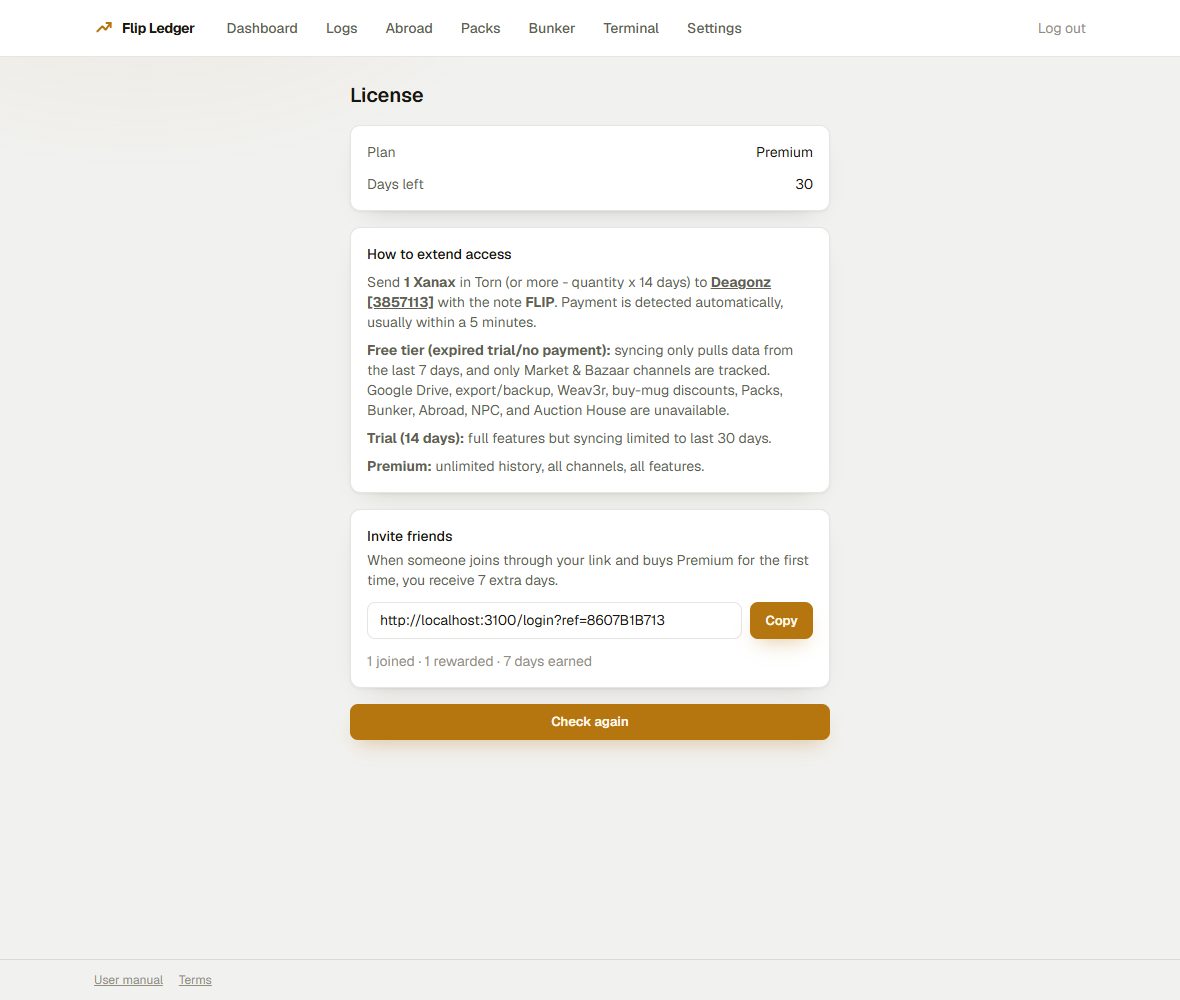
New accounts get a 14-day free trial with full feature access (syncing is limited to the last 30 days of history on trial). After that, extend access by sending Xanax in Torn to Deagonz with the exact note FLIP - each Xanax adds 14 days of access. Payment is detected automatically, usually within a few minutes; use Check again on this page right after sending to refresh without waiting.
Free tier (expired trial/no payment): syncing only pulls data from the last 7 days, and only Market & Bazaar channels are tracked. Google Drive, export/backup, Weav3r, TornExchange, buy-mug discounts, Packs, Bunker, Abroad, NPC, Auction House, Crimes, Points Market, and Museum are unavailable.
Trial (14 days): full features but syncing limited to last 30 days.
Premium: unlimited history, all channels, all features.
Invite friends: the License page also has your personal referral link. Share it - when someone joins through it and buys Premium for the first time, you get 7 extra days, and the card shows how many people have joined, how many were rewarded, and total days earned so far.
Settings
Everything else lives here:
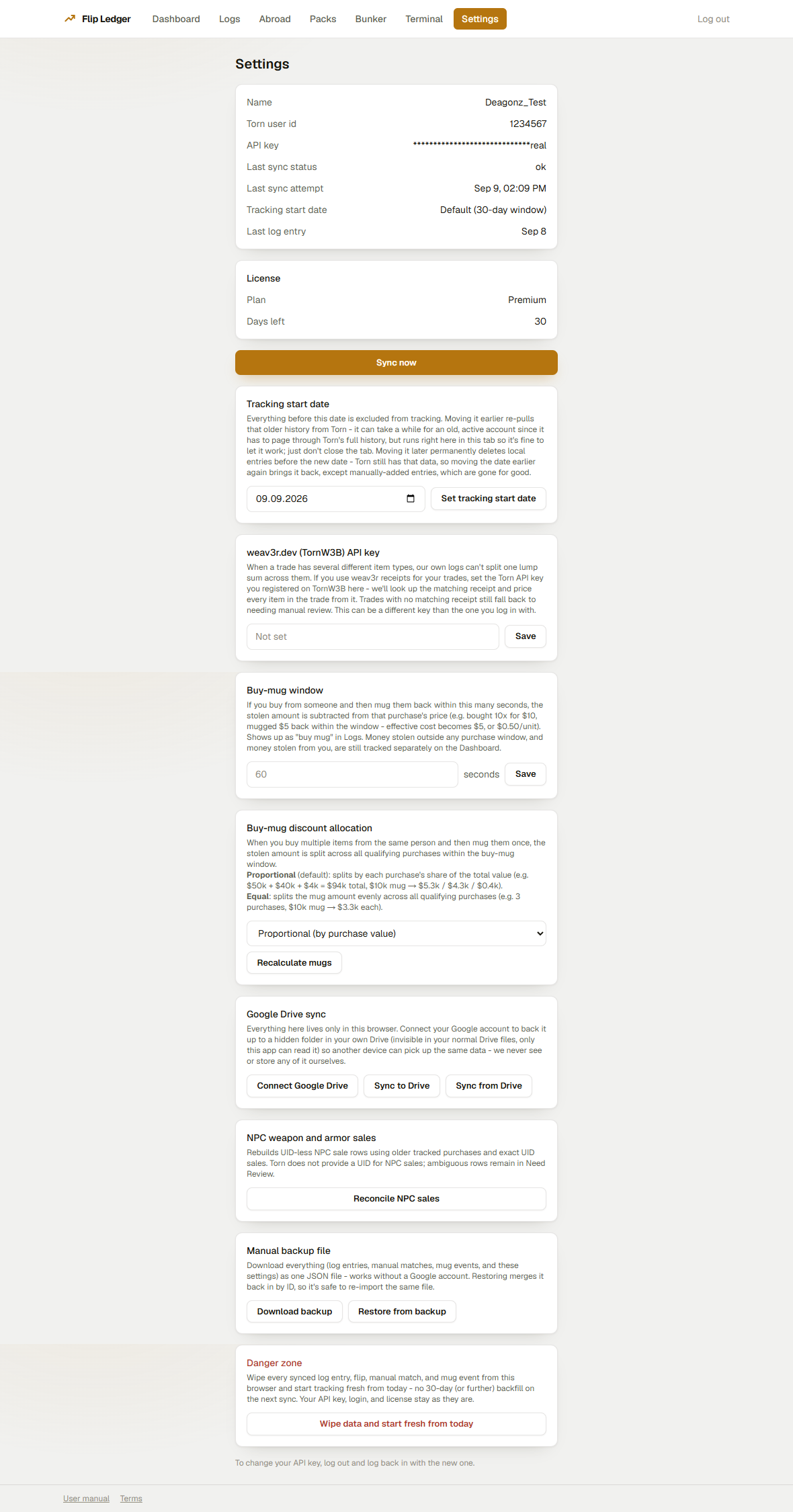
- Account info, masked API key, and sync status at a glance.
- Re-check full history - unlike the Dashboard's everyday Sync now (which only pulls what's new), this re-fetches your whole tracked window and re-applies the current tracking logic, so activity a past update didn't yet support (like faction points tracking) gets picked up. Doesn't delete anything.
- Pull logs from a specific date - a deeper backfill than the normal 30-day auto-sync window, useful for re-pulling an old account's full history. Moving the date earlier re-pulls older history; moving it later permanently deletes local entries before the new date (with confirmation).
- Your optional weav3r.dev API key, used to auto-price multi-item trades.
- Your optional TornExchange API key, a second receipt source for the same multi-item-trade auto-pricing (see Logs).
- The buy-mug window (seconds) - buy from someone, then mug them back within this window, and the stolen amount is subtracted from that purchase's price.
- Buy-mug discount allocation - when you buy multiple items from the same person and mug them once, the stolen amount is split across qualifying purchases. Proportional (default): splits by each purchase's share of total value. Equal: splits evenly. A Recalculate mugs button reapplies the current method to all history.
- NPC weapon and armor sales - Torn doesn't give NPC sales a UID, so a Reconcile NPC sales button rebuilds those UID-less rows using your older tracked purchases and exact-UID sales; ambiguous ones stay in Need Review.
- Google Drive sync - back your data up to a hidden folder in your own Drive so a second device can pick it up. Connect, sync to/from Drive, or disconnect (which only stops this app syncing - it doesn't touch the file already in your Drive or revoke Google's own access grant).
- A manual JSON backup file you can download and restore from - works without Google, and re-importing the same file is safe (it merges by ID).
- Danger zone: Wipe data - permanently deletes all synced log entries, flips, manual matches, and mug events from this browser and starts tracking fresh from today. Your API key, login, and license stay intact.
Google Drive sync and backup/export require an active trial or license.
Terms of Service
The Terms of Service page covers the service description, user responsibilities (API key usage, trial/premium, prohibited activities), data & privacy, service availability, limitation of liability, termination, changes to terms, Torn API key disclosure, and contact information.
Questions not covered here can be sent via the owner's Torn profile - Deagonz [3857113].